Project Payroll CrewTime
The timesheet that never misses a punch.
15 minutes, your EBA, no sales script.
The punch is sacred
Reliability first, features second
Every timesheet app fails the same way: a clock-in that freezes, needs signal, or needs six taps. We built CrewTime so the punch never fails.
Works with zero signal
Offline-first clock-on. The punch is written on the device, queued, and synced the moment coverage returns. Basement, tunnel, greenfield site, it does not matter.
Two taps, done
Clock on in under 2 seconds. No logins to remember at 6am, no loading spinner while the crew waits at the gate.
Kiosk mode for flat batteries
The Site Sheet tablet kiosk lives on the shed wall. No phone, no problem, the worker taps their name and gets on with the day.
Multi-job days
Morning on one site, afternoon on another
A worker can split a single day across as many jobs and cost codes as the day needs. Each block lands against the right job automatically, so job costing is right before the pay run starts and nobody reallocates hours afterwards.
Wednesday
8.0 hrs captured
- Job 4102 · Northbridge fitout
- 6:30am to 11:00am · CC 21-400
- Job 4118 · Depot slab
- 11:30am to 3:00pm · CC 30-110
Live roster
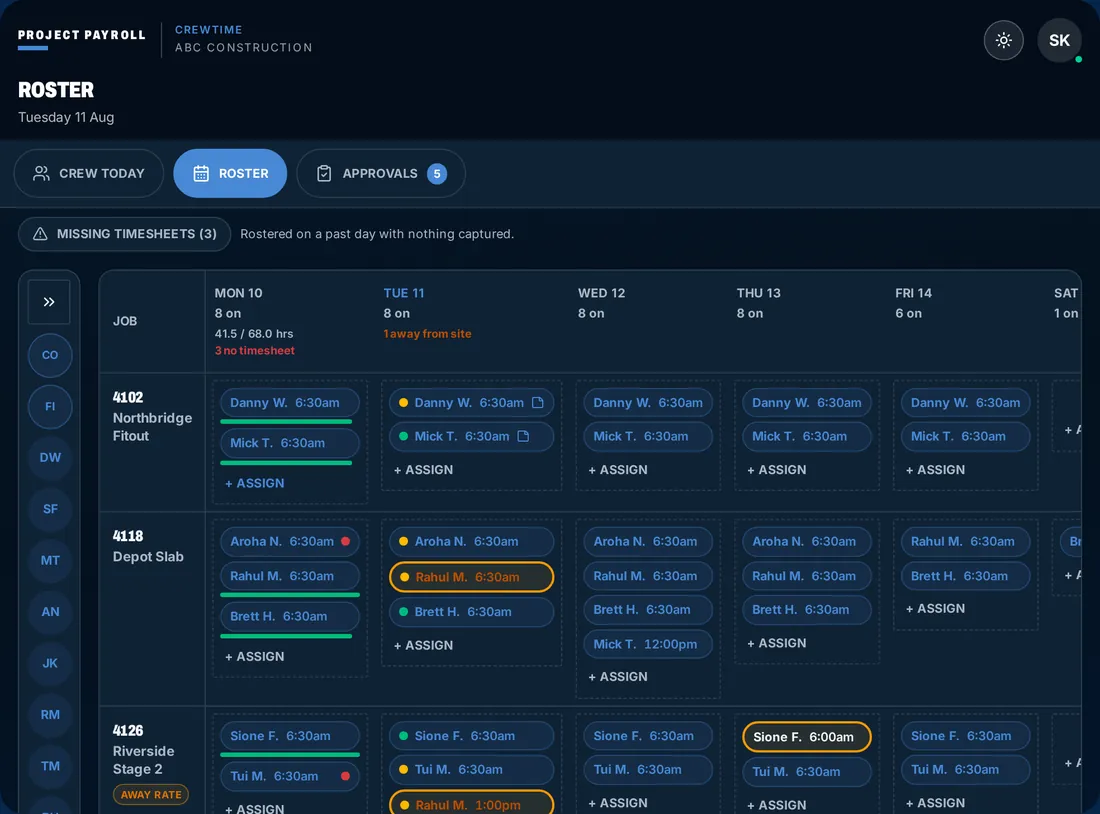
The week on one screen, in the shed
The roster is the same screen the foreman works from and the office plans in. Jobs down the side, days across the top, and live status on every chip, so the gaps show up while there is still time to fill them.
Condition flags
The foreman shouldn't have to be the bad guy
Allowances turn into arguments when one person on site has to decide what the work was worth. CrewTime splits the decision into three layers, so the rate comes from the agreement, not from a conversation at the gate.
The worker flags it
Height, confined space, wet weather, dirty work, live traffic. The person doing the work taps the condition when they clock on or at the end of the block.The foreman confirms it
Flags land in the foreman's approval view with the job and the time block attached. One tap confirms, one tap sends it back.The rules engine prices it
Once confirmed, the allowance is applied from your agreement at the correct rate, citing the clause. The judgment call is encoded, not argued about on site.
Day types
Not every day is a worked day
Mark the day for what it was. Each type flows to payroll with the correct treatment automatically, no separate leave form and no adjustment after the run.
Labour hire and RCTI
Labour hire crews, handled
Labour hire has its own worker type in CrewTime, so hosted crews clock on the same way your own crew does while staying separate in the numbers. Hours are captured once, then recipient-created tax invoices are generated from the approved blocks without anyone re-keying a timesheet into an invoice.
Labour-hire worker type
Agency and hosted workers are tagged at setup, with their own rates, jobs and approval path.Approved once
The foreman approves the block on site. That approval is what the invoice is built from.RCTI generated
Recipient-created tax invoices come out of the same hours, matched to the job and cost code they were worked against.
Five roles
One app, five ways in
Everyone sees the part of the job that is theirs. Nobody is trained on a screen they will never use.
Worker
Clock on and off, split the day across jobs, flag conditions, and see your week and your pay lines as they build.
Foreman
Approve the crew in one pass, confirm condition flags, see the roster and who has not clocked on yet.
Admin
Full control of jobs, cost codes and worker types, an exceptions queue for anything odd, then a clean handoff into the pay run.
Invite
SMS-invite onboarding. A new worker gets a text, taps the link, and is set up in under a minute. No app-store hunting on day one.
Kiosk
A shared tablet on the site shed wall for crews without phones, or for the mornings when the phone is flat.
See it working
The kiosk on the shed wall, in your browser
This is the Site Sheet kiosk: a landscape tablet with the whole crew on one screen, big enough to tap with gloves on. The interactive demo runs all five roles with a mock crew of eight, including the offline queue.
- Grey tile is not on yet, green is clocked on with the start time, amber needs a look.
- Tap a name, enter a PIN, confirm the job. Two taps and the day has started.
- Drop the signal and punches still land, queued on the tablet until coverage returns.
Photo timesheet capture
Still on paper? Photograph it.
Not every crew goes fully digital on day one, and that is fine. Photograph the paper sheet and CrewTime does the typing, which makes it the bridge between the way your sites run now and the way they will run in a month.
Photograph the sheet
OCR reads names, jobs, start and finish times off the page and drafts the day for each worker.A human reviews it
Review is mandatory. Nothing reaches payroll until a person has checked and corrected what was read.The photo is kept
The original image is retained against the timesheet as an audit record, so the paper trail survives the migration.
Site diary
The day record and the timesheet are the same thing
Record equipment used, works completed, weather and delays, photos and client sign-off on the same day the crew clocked on. Then export a docket PDF per job per day.
Site diaries and day dockets
One signed record, no separate diary app, nothing to reconcile between the day and the pay run.
CrewTime questions
Does CrewTime work without mobile coverage?
Yes. Clock-on is offline-first, so the punch is stored on the device and queued. When the phone or tablet finds coverage again it syncs, with the original times intact.
Can a worker be on more than one job in a day?
Yes. A day can be split into as many blocks as it needs, each against its own job and cost code, so labour lands in the right place without anyone re-keying it later.
How are site allowances decided?
Workers flag the condition, the foreman confirms it, then the rules engine applies the allowance your agreement writes. The foreman is not left deciding the rate.
Do you handle labour hire and RCTIs?
Yes. Labour-hire workers have their own worker type, and recipient-created tax invoices are generated from the approved hours, so nobody re-keys the same timesheet twice.
What if some of our crews are still on paper?
Photograph the sheet. OCR reads it, a human reviews and corrects it before anything hits payroll, and the original photo is retained as an audit record.
Is there a CSV step anywhere?
No. Approved hours flow from clock-on to cost code to payroll, and out to Procore, Xero and MYOB. There are no CSV exports in the workflow.
Reviewed August 2026.

Synced, not uploaded
Clock-on to cost code, straight through to payroll
Approved hours move from the site to the pay run on their own, and out to Procore, Xero and MYOB. No CSV exports anywhere in the workflow.
15 minutes, your EBA, no sales script.
No lock-in · Published pricing · We reply within one business day