Project Payroll · Crew Time rostering
Rosters that turn into timesheets
Plan crews, jobs and shifts in the same place as their timesheets. See who's on, check the gaps and send approved worked hours into Employment Hero.
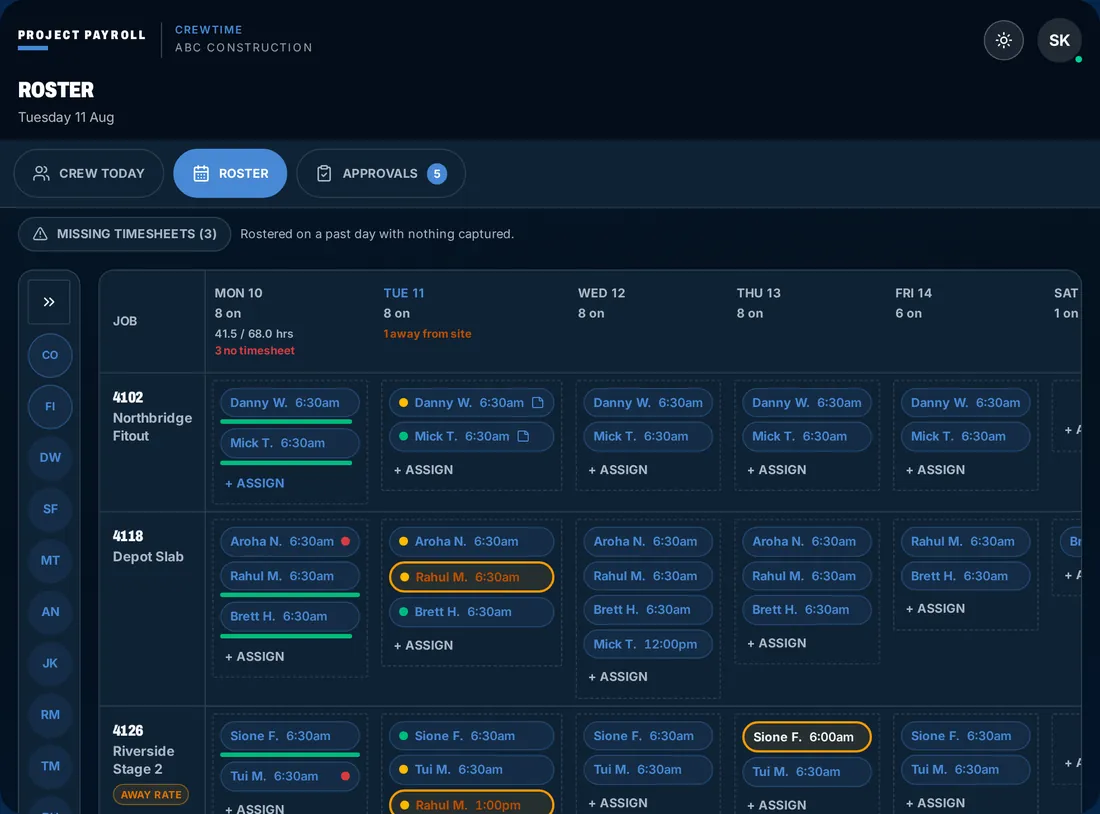
Crew status
Who's on, who's late, what's missing
Compare the planned shift with the captured time. The foreman and office work from the same roster view.
On
See who has clocked on and their clock-on time, including when a punch was away from site.
Not on yet
When the rostered start has passed, see who's still not on. Check the gap rather than guessing who is running late.
Missing timesheet
Past rostered shifts with no captured timesheet are flagged, so the office knows what needs following up.
Roster to timesheet
The planned week and the worked week, together
The roster is the plan, not a record of hours worked. Crew Time captures the actual time, the foreman approves it and Employment Hero receives the approved timesheet.
- 01
Clock onsite
Phone or site kiosk, works offline and syncs when signal returns.
- 02
Job-costedhours
Every hour coded to job, cost code and work type.
- 03
Dockets andapprovals
Foreman approves the day, client signs the daily docket.
- 04
Award/EBA rulesin EH
Employment Hero calculates penalties, allowances and RDOs from your setup.
- 05
Pay runin EH
Your team runs pay in Employment Hero. We never touch wages.
We can build your award and EBA setup in Employment Hero. Custom quote, book a call.
Keep the hours connected
From site planning to Employment Hero
From the blog
Night Shift Sequence Rules Across Pay Periods
How to carry EBA night-shift sequences across pay periods, including loadings, overtime, leave, RDOs and super calculations.
Updated 25 October 2026
We're an independent add-on, not an Employment Hero product or an official Employment Hero partner.